
Free video, music & image downloader
Save videos, music
and photos from any site.
Save videos, music and photos from most sites. The engine recognizes 1,000+ site formats. Free, no sign-up.
Choose a quality or format after we find your media.
Three moves, one file
Copy the link
Open a video, post or pin and copy its address from the share menu or the address bar.
Paste it up top
Press Download. We find videos and pictures on the page and list them with their available formats.
Pick and save
Choose MP4, MP3, a quality or a picture. Your browser saves the file to your Downloads folder.
More than videos
A page can have a track, a photo set or a playlist too. Choose what you want to save after we look it up.
Video and audio
- Save video as MP4, with quality options up to 1080p on the website.
- Save audio as MP3 or M4A when the source offers it.
- Browse playlist entries and choose the ones you need.
Images and collections
- Save individual pictures in full size where the source provides it.
- Bundle pictures from a page into one ZIP file.
- Behance projects can be saved through the extension.
1,000+ sites, one familiar flow
The engine recognizes over a thousand site formats, from social posts and short clips to music, file hosting and streaming players. Here are some familiar places to start.


Most public links work. Login-only or region-restricted pages may need the extension. Paid videos protected by DRM cannot be downloaded.
Pick your site
These guides explain what you can save from each site, how to get the link, and what may not work.
- TikTokVideos as MP4, audio as MP3
- InstagramVideos as MP4, audio as MP3
- X (Twitter)Videos as MP4, audio as MP3
- FacebookVideos as MP4, audio as MP3
- VimeoVideos as MP4, audio as MP3
- PinterestImages and videos
- RedditVideos as MP4, audio as MP3
- DailymotionVideos as MP4, audio as MP3
- SoundCloudTracks as MP3
- TwitchVideos as MP4, audio as MP3
 BehanceImages and videos
- BilibiliVideos as MP4, audio as MP3
- BlueskyVideos as MP4, audio as MP3
- 9GAGVideos as MP4, audio as MP3
- ImgurImages and videos
- TumblrVideos as MP4, audio as MP3
- VKVideos as MP4, audio as MP3
- LoomVideos as MP4, audio as MP3
- KickVideos as MP4, audio as MP3
- OdyseeVideos as MP4, audio as MP3
- NiconicoVideos as MP4, audio as MP3
- BandcampTracks as MP3
- MixcloudTracks as MP3
- DropboxVideos as MP4, audio as MP3
- Google DriveVideos as MP4, audio as MP3
- Internet ArchiveVideos as MP4, audio as MP3
- SnapchatVideos as MP4, audio as MP3
- StreamableVideos as MP4, audio as MP3
 Medal.tvVideos as MP4, audio as MP3
- LinkedInVideos as MP4, audio as MP3
- RutubeVideos as MP4, audio as MP3
- OK.ruVideos as MP4, audio as MP3
 BitChuteVideos as MP4, audio as MP3
- PeerTubeVideos as MP4, audio as MP3
- SubstackVideos as MP4, audio as MP3
- VidyardVideos as MP4, audio as MP3
- ZhihuVideos as MP4, audio as MP3
- WeverseVideos as MP4, audio as MP3
- JamendoTracks as MP3
- GloboplayVideos as MP4, audio as MP3
- Apple PodcastsTracks as MP3
- iHeartRadioTracks as MP3
- JW PlayerVideos as MP4, audio as MP3
- KalturaVideos as MP4, audio as MP3
- Cloudflare StreamVideos as MP4, audio as MP3
- SproutVideoVideos as MP4, audio as MP3
- VidioVideos as MP4, audio as MP3
- WeTVVideos as MP4, audio as MP3
- AcFunVideos as MP4, audio as MP3
- Tencent VideoVideos as MP4, audio as MP3
- Mango TVVideos as MP4, audio as MP3
- SOOP (AfreecaTV)Videos as MP4, audio as MP3
- XimalayaTracks as MP3
- MLBVideos as MP4, audio as MP3
- NFLVideos as MP4, audio as MP3
Website limits, up front
The free website has fair-use limits. The browser extension has no hourly download limit.
On this website
- 40 link lookups and 15 downloads per hour.
- Up to 2 downloads at the same time.
- Videos up to 1080p and 3 hours long.
- ZIPs up to 60 pictures and 300 MB.
Need more room?
The free extension works inside your browser and has no hourly limits. Some sign-in pages and Behance projects only work there.
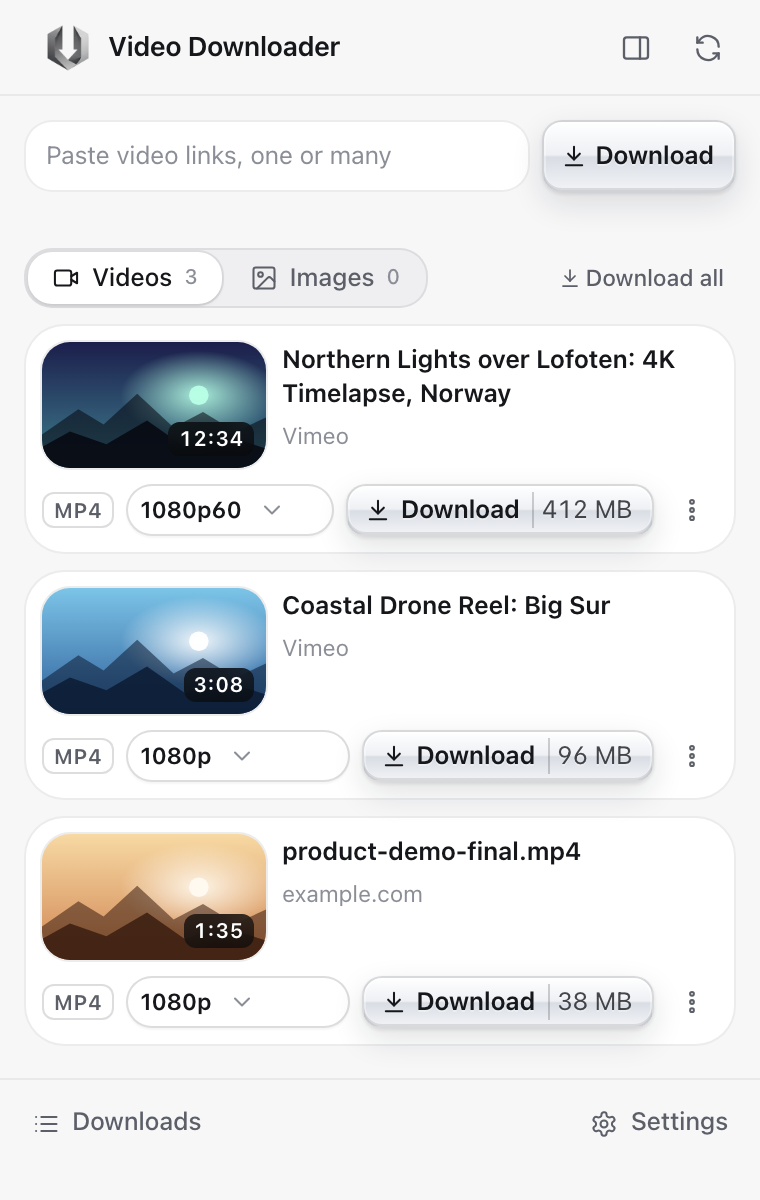
Add to Chrome, it's freeSkip the paste. The extension does it on the page.
The free Chrome extension finds videos and images on the page you are already on, streaming players included. Save in full quality with no hourly limit, no account and no tracking.
Straight answers
Is it free?
Yes. The website has hourly fair-use limits; the Chrome extension has no hourly limit. Neither needs an account.
Where do the files go?
To your browser's Downloads folder, like any other download.
Which sites work?
Most sites with public videos, posts and pictures. Paid streaming services that protect videos with DRM do not work anywhere.
Why does the website send me to the extension sometimes?
Some sites only show pages to a real browser or signed-in users. The extension works inside your browser, so it can access pages the website cannot.
Is it legal?
Only download content you have the right to save. Respect creators and the terms of the sites you use.